Compliance, dockets and invoicing in one system.

Everything a bulk haulage operation runs on, from a driver's medical to the RCTI that pays their contractor and the invoice to your customer. Your office, contractors and drivers each work in their own view of the same records, and your customers see the loads behind every claim.

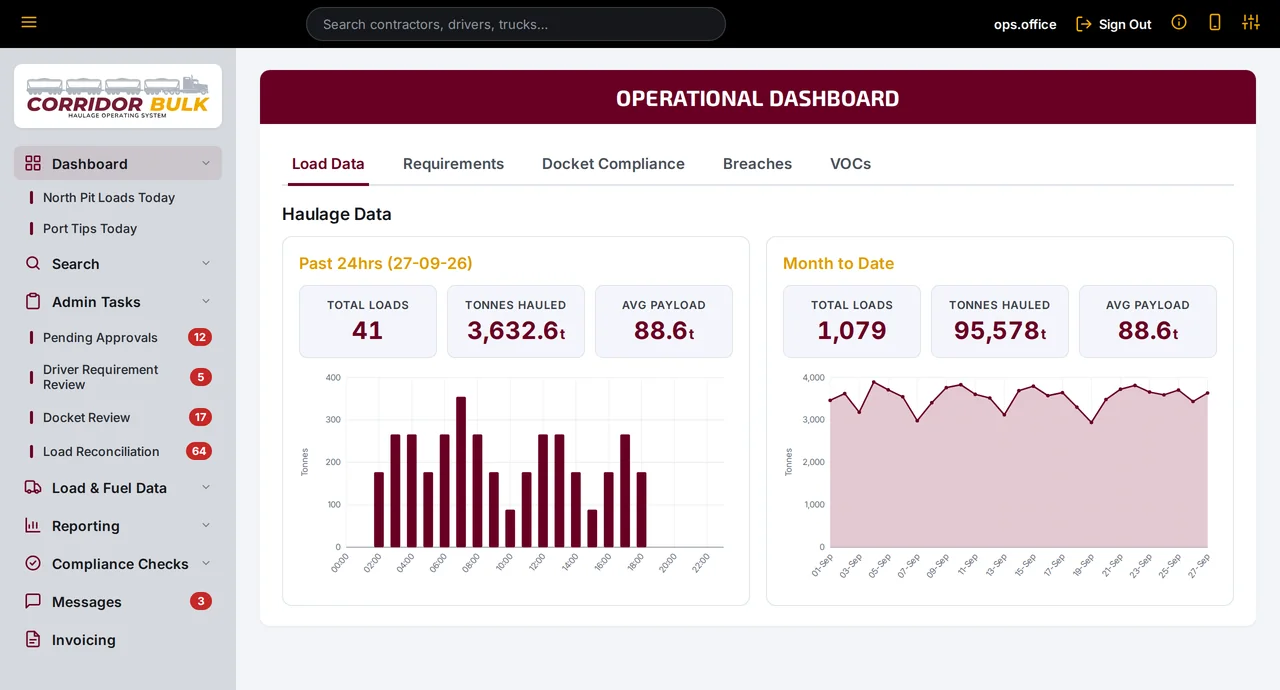
Corridor Bulk operational dashboard with loads, tonnes hauled and average payload
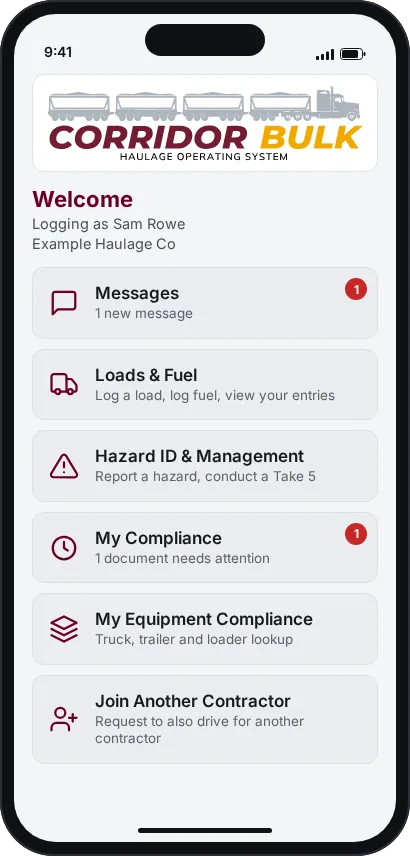
The Corridor Bulk driver app home screen on a phone
Compliance

Know who's cleared to work before the first load.

Set the licences, inductions, inspections and documents each contractor, driver, truck, trailer and loader must hold. Corridor Bulk tracks every one to expiry.

  • Requirement types for contractors, drivers, trucks, trailers, loaders and ancillary equipment
  • Uploads from contractors and drivers queue for approval, reviewed with the document on screen
  • Status tracked automatically: valid, expiring within 30 days, expired, pending, rejected or missing
  • Requirement matrices show a whole fleet on one screen, filtered to who actually loaded
  • A driver who logs a load against a lapsed requirement is warned, and the breach is recorded
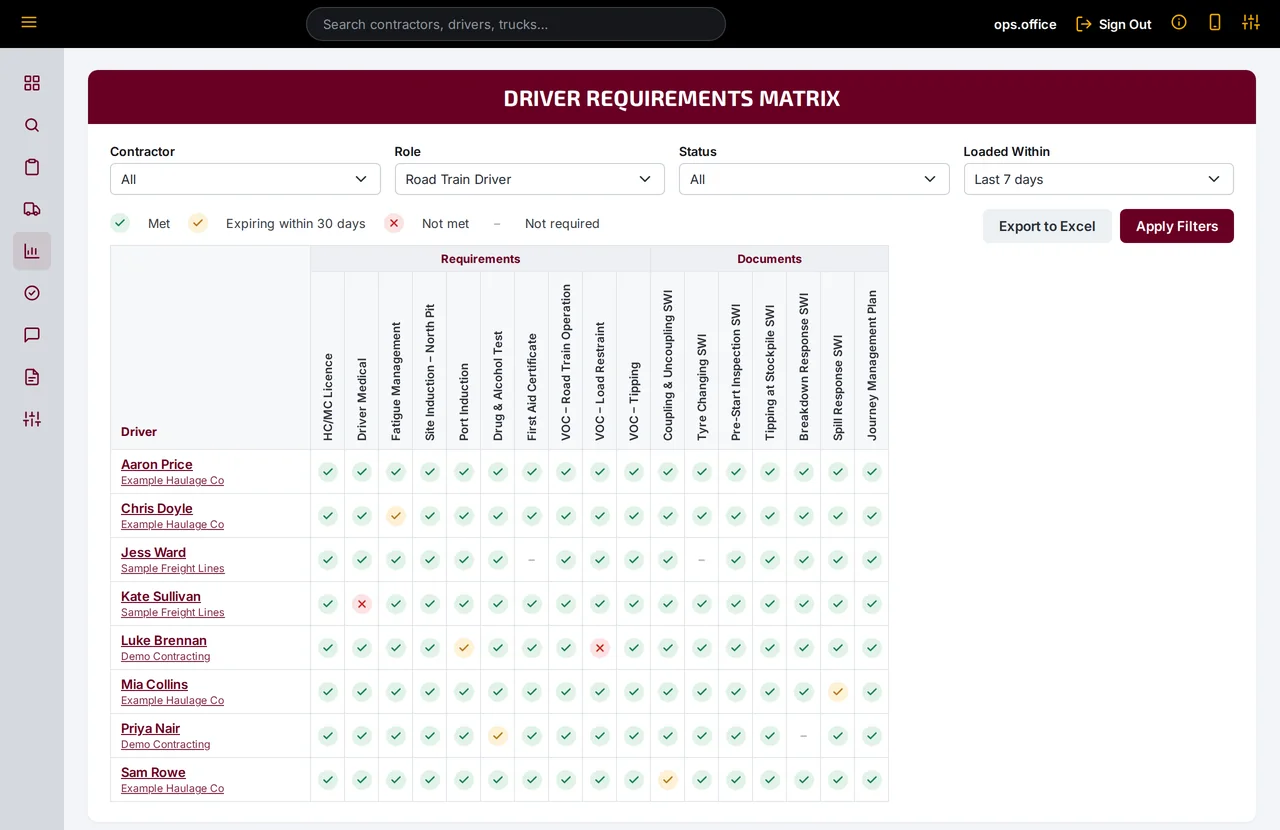
Driver requirements matrix with green, amber and red status icons for each driver and requirement
Driver Requirements Matrix, filtered to road train drivers who loaded in the last seven days.
Driver app

Drivers log loads from the cab, not the office.

Each driver gets a personal app link. It opens on their phone with no password to remember, and it can be revoked and reissued in a click.

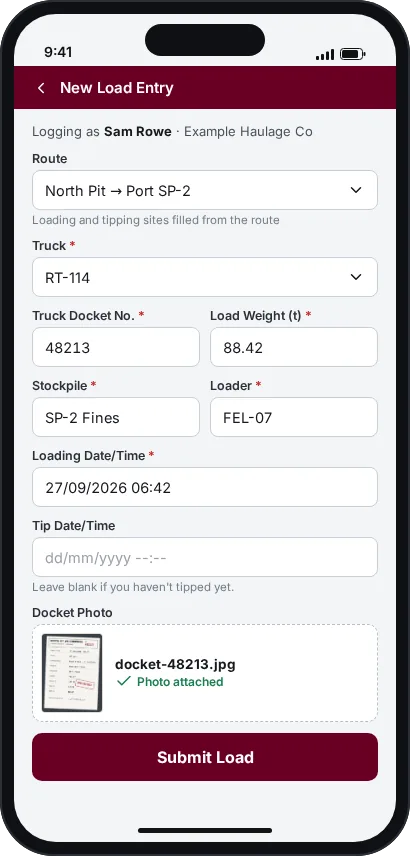
  • Log a load with route, truck, stockpile, loader, weight and a photo of the docket
  • Add the tip time later from their own entries
  • Log fuel, report a hazard or complete a Take 5
  • Upload their own licences and certificates, and see what's due
  • Read and acknowledge notices from the office
Driver app home screen with messages, loads and fuel, hazards and compliance New load entry form with route, truck, docket number, weight and an attached docket photo
The driver app home screen and new load entry, as they appear on a phone.
Contractor Access

Your contractors get their own version of the system.

Create a login for a contractor in your contractor register and they get Contractor Access: the same records your office works from, filtered to their own trucks, drivers and loads, and limited to what they're meant to see.

Office view

328 loads · 29,059.8 t

All three contractors, 15–21 Sep

For your office. Contractors upload their own documents, keep their fleet details current and check their own loads, so you review instead of chasing.

Contractor Access

146 loads · 12,934.6 t

Example Haulage Co only, same week

For your contractors. The same loads, on-charges and RCTIs your office sees, as they happen, so questions are settled before pay day.

Logins are created and removed in the contractor register. Other contractors' records, customer claims and invoices, and your sell rates stay with the office.

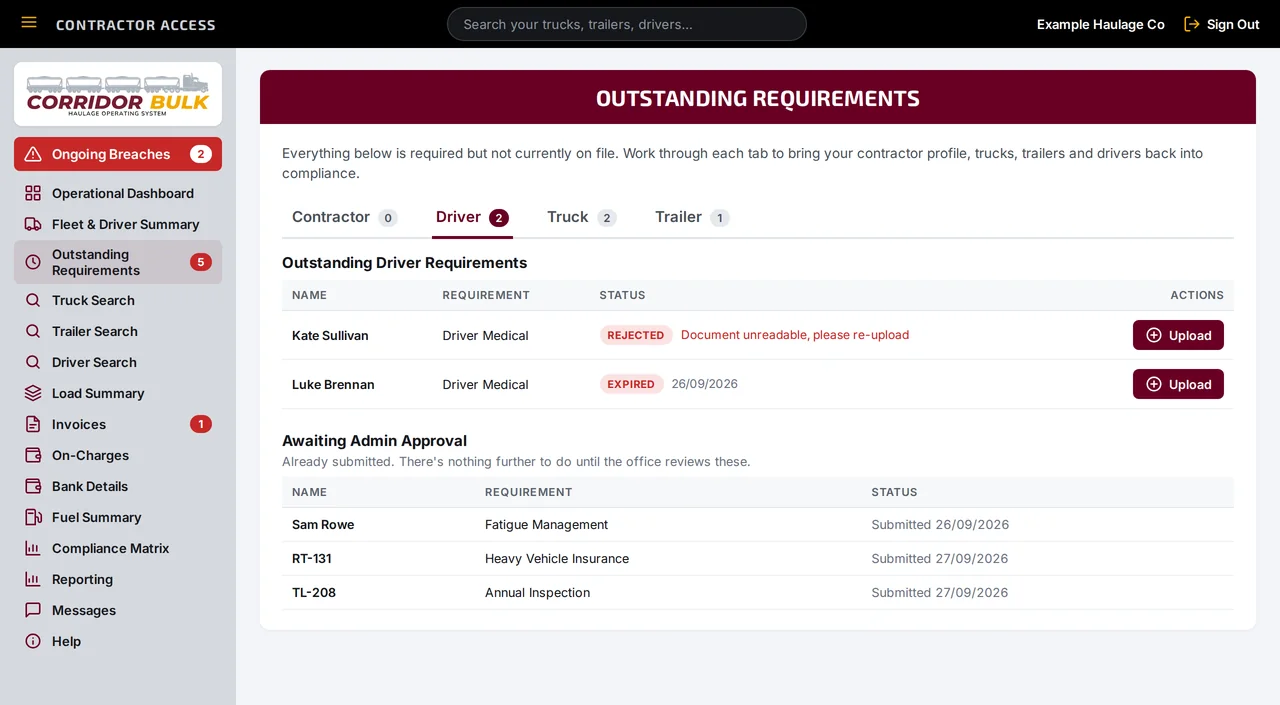
Outstanding Requirements in Contractor Access, with driver tabs, a rejected and an expired driver medical to upload, and items awaiting office approval
Outstanding Requirements: anything missing, expired or rejected, with an upload button on each row.
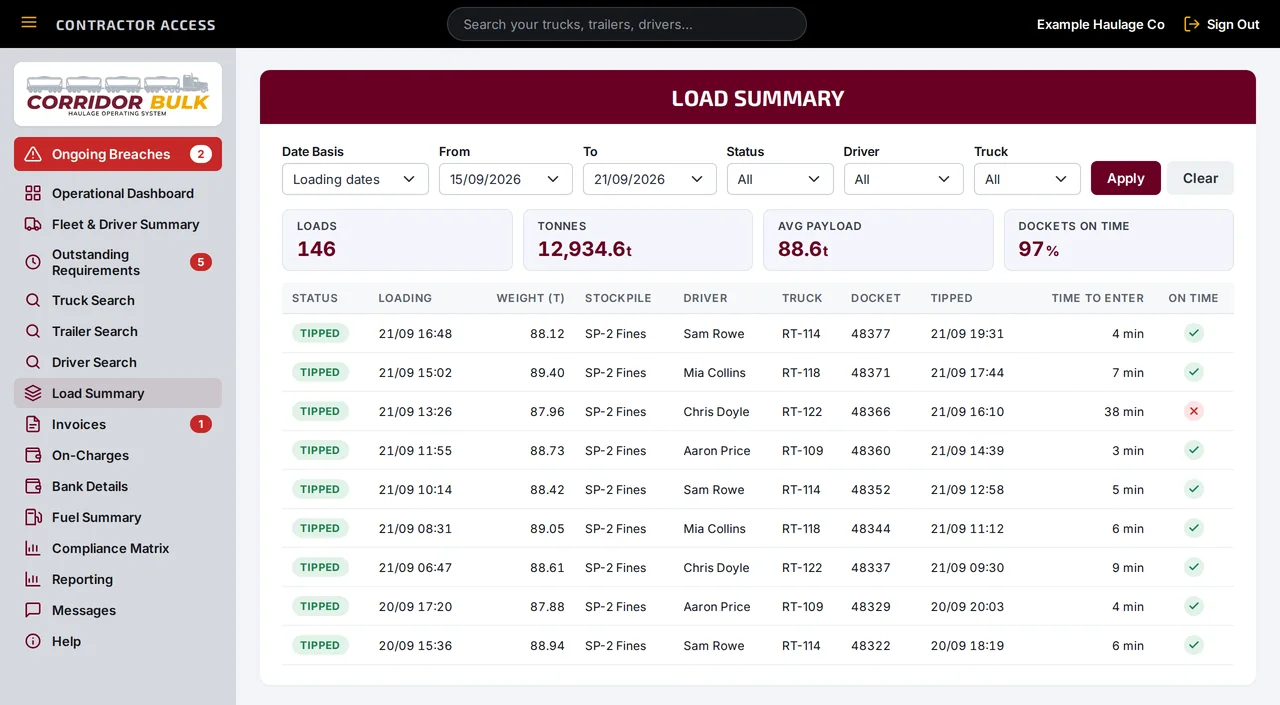
Load Summary in Contractor Access with date, status, driver and truck filters, totals for loads, tonnes, average payload and dockets on time, and a list of tipped loads
Load Summary: every load the contractor's trucks hauled, with totals for the filtered set.

Compliance

  • Outstanding requirements, each with an upload button
  • Ongoing breaches shown first at login
  • Rejected items come back with the office's comment, ready to fix and resubmit
  • Compliance matrices and printable reports

Fleet and drivers

  • Add trucks, trailers and drivers for the office to approve
  • Request removal when one leaves the fleet
  • Email a driver their app link
  • Accept or decline drivers asking to join

Loads and pay

  • Every load their trucks hauled, with filters and totals
  • RCTIs to approve, or dispute with a comment
  • On-charges listed before they're deducted
  • Bank details checked by the office before they're used

Reports and messages

  • Their own operational dashboard
  • Driver, truck and trailer compliance reports
  • Docket upload timing by driver
  • A message thread with the office, and a built-in guide
Dockets and reconciliation

Every docket checked against the photo and the loader.

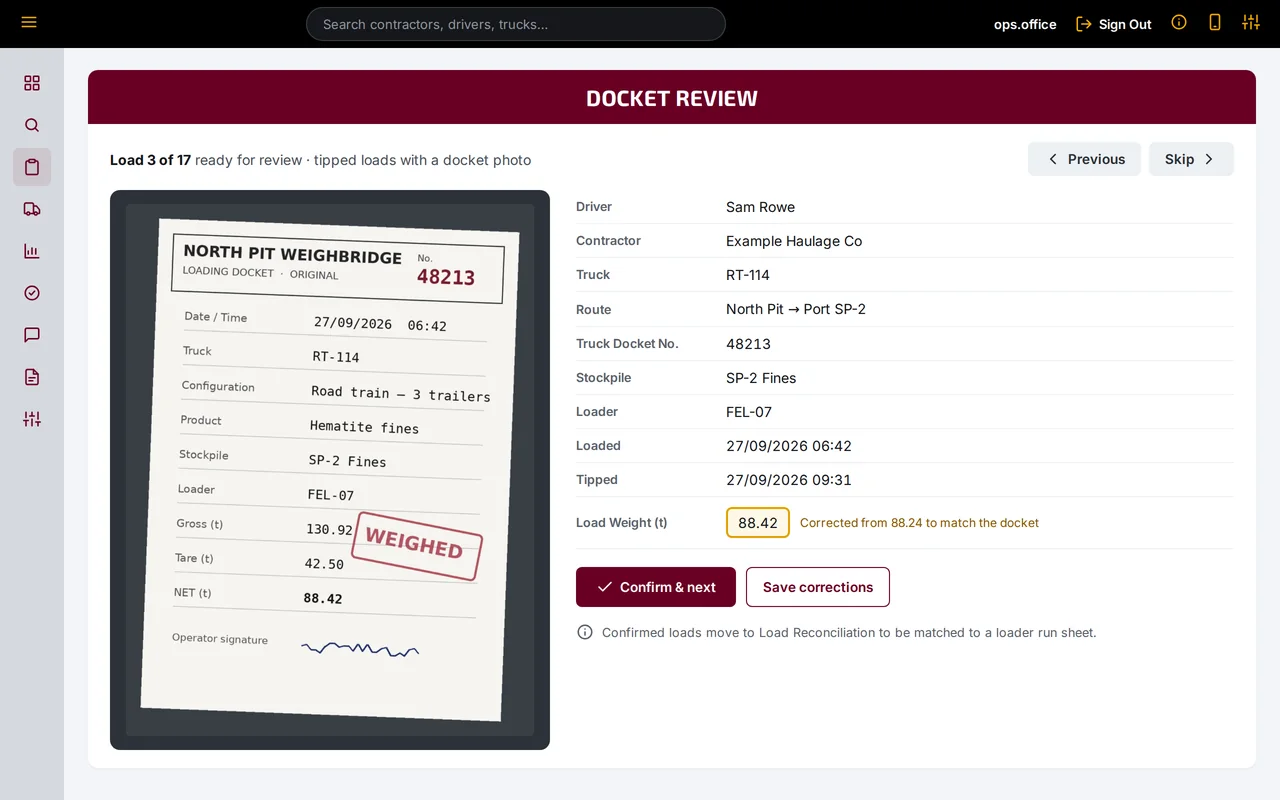
Tipped loads with a docket photo queue up in Docket Review, one at a time, with the photo beside the entry. A wrong weight takes seconds to correct.

  • Confirmed loads are matched to the loader's run sheet in bulk
  • Loads without a paper docket stay on the Missing Docket Log until it turns up
  • The Docket Report filters by date, driver, truck, route, contractor and status, and exports to Excel or PDF
  • With the Stockpile Management System, each load comes off its mine stockpile and onto the port stockpile automatically
  • Bulk upload and bulk edit for the jobs that need them
  • A live Truck Billboard for the office wall screen
Docket review screen showing a photographed weighbridge docket beside the details the driver entered
Docket Review: the photographed docket beside the driver's entry, with a corrected weight.
Invoicing

Pay contractors and invoice customers from the same loads.

Every reconciled load drives both sides of the ledger: an RCTI that pays the contractor who hauled it, and a tax invoice to the customer it was hauled for. One record sits behind both, so contractor and customer payments move without the month-end argument.

Reconciled loads · 15–21 Sep

328 loads · 29,059.8 t

  • Checked against the docket photo
  • On a loader run sheet
  • Run sheet reconciled
  • Not already billed

Paying contractors

RCTIs for contractors

Recipient-created tax invoices, raised by you from the loads each contractor actually hauled.

  • Priced at the contractor's own rate or the route rate, and a load with no rate blocks the invoice
  • Fuel and damage on-charges are offset automatically
  • A separate approver signs off, then the contractor approves or disputes it in Contractor Access
  • Issued only where a written RCTI agreement is on record
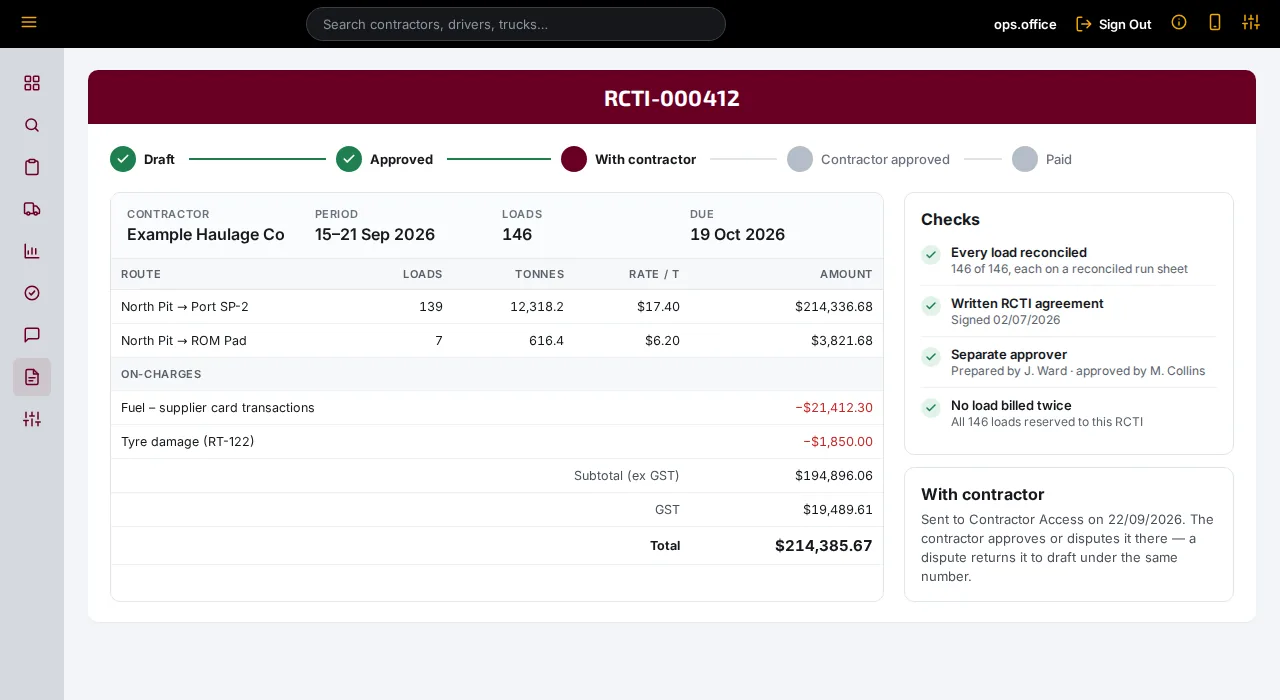
RCTI detail for Example Haulage Co with route lines, on-charges, totals and a status bar from draft to paid
RCTI-000412: one of three contractor RCTIs for the week, waiting on the contractor's approval.

Invoicing customers

Tax invoices for customers

Traditional tax invoices, built from the same loads at each customer's sell rates.

  • A claim goes out first, with the load-by-load detail in PDF and Excel
  • The customer certifies it and issues a PO, and any rejected loads come back to be checked
  • The invoice must match the certificate, then it's approved, issued and tracked to paid
  • A named approver signs off each claim and invoice, never the person who prepared it
Customer tax invoice for Example Mining Pty Ltd, raised against a certified claim and purchase order, with route lines and totals
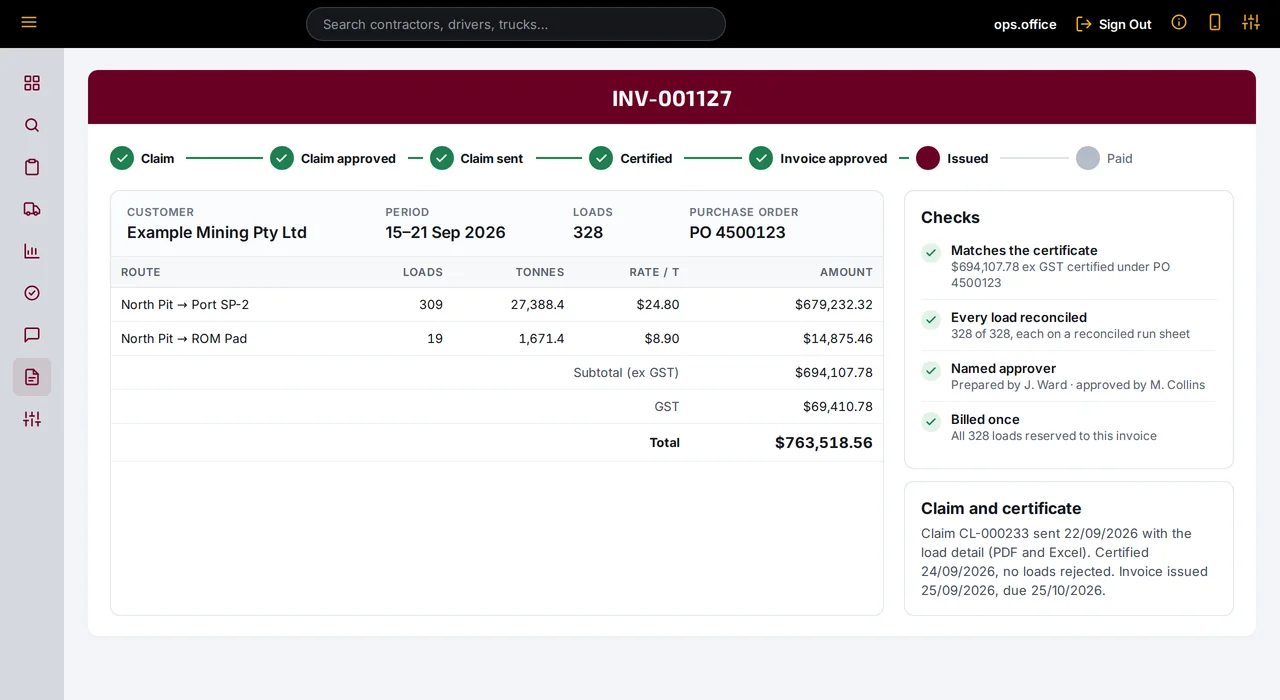
INV-001127: the customer's tax invoice for the same 328 loads, raised against the certified claim.

One source of truth

The company, drivers, contractors and customers all work from the same load records. Drivers see their own entries, contractors see their own loads and RCTIs in Contractor Access, and customers get the loads behind every claim.

Checked every day

A load can't be billed until it's checked against its docket photo, placed on a loader run sheet, and that run sheet is reconciled too. Problems surface the day they happen.

No month-end surprises

RCTIs and customer invoices come from the same reconciled loads, so they agree with each other and with the dockets. Payments aren't held up while numbers are chased.

Also included

The rest of the operation, in the same system.

Fuel

Import the supplier's weekly card transaction report as it arrives. Cards map to trucks, repeat imports are skipped, and prices can be compared with FuelWatch.

Safety and field checks

Configurable checklists, BAC tests, verification-of-competency assessments, hazard reports and safety meetings, each with its own register.

Messages and documents

Send notices to every driver or a chosen few and see who has acknowledged them. Publish procedures and track sign-off on the current version.

Reporting

An operational dashboard for loads, tonnes and payload, plus the daily haulage report, load and fuel reports, compliance reports and per-site boards.

Control and security

Permissions per area as none, read or write, named roles, two-factor sign-in, and an audit log of sign-ins, approvals and edits.

Your branding

Your logo, colours, sign-in background and home-screen icon, so drivers and contractors see your name on every screen.

See it working on an operation like yours.

Tell us what you haul, where it goes and how you run it today. We'll walk you through Corridor Bulk using an operation that looks like yours.

or email [email protected]